I wanted to make something to embellish the packaging of a baby shower gift for my son and girlfriend and found this adorable Shaker Baby Rattle (SVG, Silhouette). Who could resist shaking this gift now!
Layers of the rattle are built up so that you can insert chunkier objects. I placed a rocking horse button and small sequin stars inside mine. This adorable button had a shank fastener on the back of the button that I just snipped off.
Go check out all of Lori's new designs and while you are at it, grab this FREE cut file! No code or minimum purchase required.
Did I mention all those designs are 30% off!!!!! Use code MAY2022 to get 30% off all SVGs, Fonts and Commercial Licenses!
And finally, how would you like to win a $20 Coupon to the Lori Whitlock SVG Shop?
I wanted to try something different this year to document my December memories. A Memorydex spinner would enable me to add multiple cards to document a day if needed, or just one for days when not so much is happening. I can add photo cards, journaling cards, or just cards with paper and embellishments. It's totally flexible. Scrapbook.com has these exclusive pretty blush Heidi Swapp Memorydex spinners and they are on sale now!
Even better, there are coordinating dies and a punch so you can turn photos, papers, die cut ephemera into memorydex cards easily. I've been prepping by getting a few cards ready in advance. I'm using the Crate Paper Hey Santa collection, coordinating cardstock, as well as some other paper and embellishments in my stash.
Of course, I sneak cut files in whenever I can. I love adding filler cards that you can see through. I made these snow globe cards with a Jillibean Soup cut file, transparency paper, and sequins.
Please check out my YouTube video to see how I put these together.
Jillibean Soup came out with these adorable dots and plaids 6x8 paper pads. Fabulous if you are a card maker! But they were also perfect for doing a couple Christmas layouts. Do you like to scrap your pets at Christmas? After
all, they are part of your family too. My cats love to catnap under the Christmas tree. They don't try to climb it, they're just content to bask in the glow of the lights. I couldn't resist scrapping them on a layout.
It's hard to tell but I created a mixed media background of pale yellow and gold using some Heidi Swapp color shine. I wanted to capture the feeling of the glow of the Christmas lights. I used the Jillibean Soup Tis The Season To Be Jolly digital cut file on this layout. You can find it in the Silhouette Store. I used a mixture of the dots and plaids to create my wreath then cut my title from some red plaid and cardstock.
A few self adhesive sequins add the Christmas sparkle.
For my second layout, I pulled out a really old photo of my daughter standing in front of this advent Christmas Tree quilt panel her Grandma Nix made for her. Every night she would hang a bell on the tree before she went to bed. This way she knew how many more sleeps until Christmas. She is only 2 1/2 here ... so she wasn't too into Christmas just yet. But thrilled her Grandma made her something special! I converted my photo to black and white. I was seriously disappointed in deterioration of the color. I need to do this to loads more of my older photos!
Cut file addict that I am, i used another Jillibean Soup digital cut file in the shape of a tree, Believe In The Magic of Christmas. I backed the negative space with more red and green dots and plaids from the 6x8 paper pads and added in some yellow and woodgrain paper too.
You can see I added some journaling strips in my tree. It tells the story without covering up the design or the photo. More self adhesive sequins ... this time in silver, give it a festive air.
Banners of red and green pattern papers adorn the right side of the layout and draw your eye tight to that adorable photo. Her curls were too cute!
hello blogging friends!
It's that time of year again where JustNick Studios is giving away FREE digital cut files! I hope you have been downloading them, because they are FREE only for one day ...
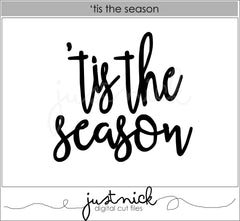
On the 8th day of Christmas my true love gave to me, 8 Maids a-milking ... Well, I have no maids a-milking for you today ... but I do have this awesome 'Tis The Season digital cut file for FREE!
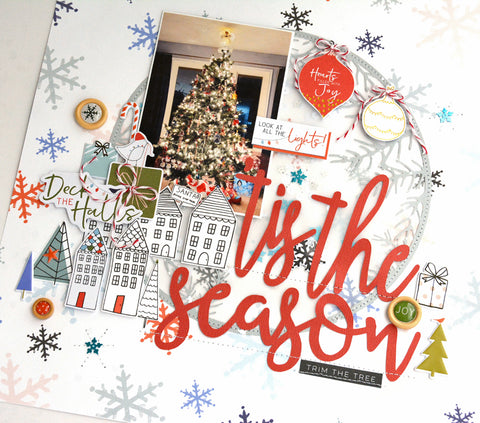
I knew the Tis The Season cut file would make an awesome title for my Christmas layout. I combined it with the Winter Frame cut file that was free a few days ago. I hope you snatched it up then, if not it is still available in the store for purchase.
I love getting my Christmas decorations out and making the house more festive.
Here is a closer look at the Tis The Season title...
It's hard to tell, but if you look closely you can see I used the Winter Frame to create a shaker element. Can you see the sequins in the middle of the frame. Some transparent vellum over the top allows them to move around a bit. I machine stitched around the edge of the frame to make sure the sequins would stay put.
I really love how this layout turned out!
Enter the code: TISFREE at checkout to get this design for free.
This code is only valid until midnight CST on December 8th, 2018.
No purchase necessary. Coupon code must be entered to receive this item for free. No refunds will be given.The design will still be available in the JustNick Store for purchase after the discount code expires.
Thanks so much for stopping by ... Come back tomorrow for another FREE cut file! Happy Holidays!!
I have a couple cards to share with you that I created with Jillibean Soup products including digital cut files. The first one I created for my neighbor who just had a liver transplant. I thought the Just Keep Swimming sentiment would be perfect for him. He has a long recovery ahead. I combined it with the Octopus stamp set (one of the fish stamps looks like a Nemo!) and a square shaker card. Some self adhesive sequins give it some bling and look like bubbles.
My second card is also a shaker card. I used the Starburst and You Are My Sunshine Jillibean Soup digital cut files to create my sun and sentiment. Here too I used the self adhesive sequins... they are perfect for adding a little extra sparkle!
Do you love to create shaker cards too? Thanks so much for stopping by today!
It's time for the July Stash Bash. This month we are focusing on using printables. Printables are a great way to stretch your supplies and they don't take up space in your supply stash. I thought I would take this opportunity to do a tutorial on how to use the Print and Cut feature in the Silhouette software to print these Santas. If I start on my Christmas cards now, there is a chance I might get them out before New Years this year, lol. The Santa driving the pink convertible is from the Carta Bella A Very Merry Christmas collection and the Santa on the right is from the PhotoPlay Paper Holiday Cheer collection.
Hello blogging friends! I think I must have Spring fever... I feel like it's been forever since I scrapped a really girly layout. Sometimes I just want to scrap pink flowers and yellow butterflies and imagine that Spring is just around the corner, especially when it's snowing outside (again!). I found the pretty JustNick StudioBoho Florals 3 and the Stems 5 digital cut files and created a gorgeous cluster to ground my photo. I was so happy to receive the new gorgeous Cocoa Vanilla Studios More Than Words collection just before the snowstorm. It's soft pastels were perfect for my Spring layout and this old black and white photo of my two girls. My Little Scrapbook store was awesome to let me preorder this Australian scrapbook manufacturer as it is difficult to find here in the States.
To add color behind my white cut files, I watered down some acrylic paint and painted a line of yellow, orange, and pink across my page and then tapped my paper to make the paint run. Then I added a few paint splatters and some stamped butterflies and I had a beautiful background! Here are some detailed shots ....
To make my flowers and stems more interesting I added sequins to the center of the pink flowers and drew some lines on the leaves with a marker.
The paint and the grey leaf stems help make the white floral cut file pop instead of blending into the background.
Here are the digital cut files I used today ...
Here is my process video if you are interested ...
I hope the rest of your week is fabulous! Take care,
~Marcia
Hello blogging friends! For those in the USA, I hope you all had an awesome Thanksgiving. Did you know that JustNick is having a Black Friday Sale going on now through Monday at the JustNick Studios online store? Everything is 50% off! That is an amazing sale!! Be sure to check it out and use the coupon code BF2017
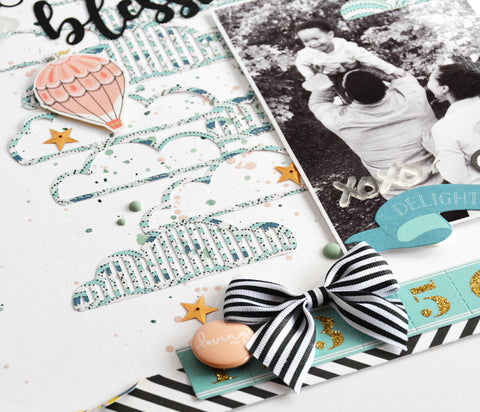
Today I have a November gratitude layout to share with you. Sometimes we need to step back and reflect on all the things we are so blessed to have, especially our loved ones. The Card Sentiment 3 digital cut file is great for creating a scrapbook title that says just that. Here is my layout...
I thought it would be fun to use the Cloud Background 2 digital cut file since my nephew seems to have his head in the clouds, lol. I saved the negative space clouds and used one on top of my photo to keep the cloud repetition going...
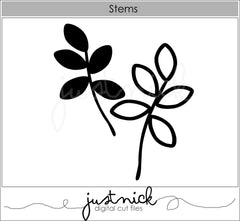
I felt like I still needed something to the right of my photo to balance out the clouds. I had a stem from the Stems digital cut file that I had previously cut out and it was just what I needed.
I love the mixed fonts in this cut file. They make this scrapbook title look so much more interesting.
Here are the digital cut files I used today...
Here is my process video if you are interested in watching ...
Thanks so much for stopping by. I hope you have a great weekend!
~Marcia