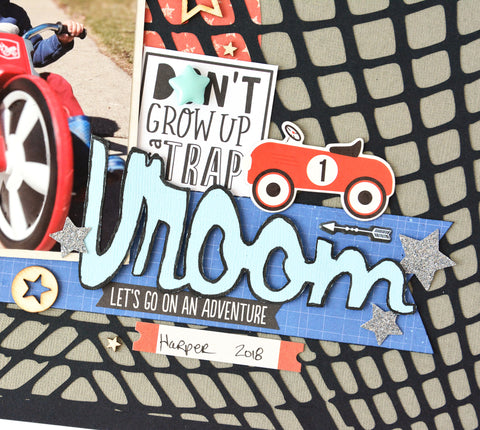
I am hoping it warms up enough here in Minnesota where the kids can be outside again riding their bikes. In the mean time, my Spring fever has me scrapping a photo of my nephew from last Spring. I thought the JustNick StudiosTread Background was perfect for this bike riding photo. I used the Simple Stories Cool Dude collection as well as some Cocoa Vanilla Studios Flying High and Totally Rad.
To get the tire treads to stand out, I backed the black tire tread design with a grey cardstock. I placed a red patterned paper circle between the layers before gluing them together. I didn't want to cover up too much of that tread design. Then my photo and embellishments went over that circle. I may have gotten a little carried away with the embellishing, lol.
I repeated the circle, adding a few more smaller circles in the opposite corner. Again, I went crazy embellishing the tops of these circles.
For my title, I warped the Vroom from the Planes Trains & Autmobiles cut file. I wanted the word to be larger starting out and get smaller. I thought it would help show movement. Here is how you can warp an object in Silhouette Studio.
1. Right click on the cut file and select Ungroup. Move the items you are not using off the grid.
2. Select the object to warp and click on the warp icon (last icon on the right).
3. Select a corner edit point and drag it outward. On the opposite end, select a corner edit point and drag it inward. Play around with the edit points until you like how it looks.
I didn't like how the stars looked warped so I trimmed them off. I replaced them with other stars from an ephemera pack. I edged the word with a black marker. This helps it pop as well as gives it a grungy feel.
I love how this turned out.
Check out the tutorial on how I warped my title in my YouTube process video.
One of my favorite destinations for a summer road trip is Grand Marais Minnesota on the shores of Lake Superior. The lake is so big it almost like seeing the ocean. It was a foggy rainy day when we were there, but that just added to it's mystic. When scrapping this favorite photo from the day, I wanted a way to convey the greatness of all that water ... Lake Superior is after all the largest of the Great Lakes. I think the JustNick StudioWave Background digital cut file does it justice! I used the Wild At Heart collection from Cocoa Vanilla Studios.
I still wanted a skyline on my layout so that I could also convey what a cloudy day it was, so I erased the top portion of the background. That left room for me to include some clouds from the Sunny Days digital cut file.
I carefully added some machine stitching to emphasize the waves on the background. I love the effect. To add interest to these wood veneer words, I embossed the lower half with some fine white embossing powder. The two-tone effect is stunning. Washi Tape on the upper half keeps it from being embossed and it peels away so easily.
Here are the digital cut files I used today ...
Thank you so much for stopping by. Have a great rest of the week.
I am so happy to be back designing for JustNick Studios. You know I am a digital cut file junkie and Nicole's cut files are some of the best out there! Our first assignment for the term is an All About Me project so you can get to know us better. So here is a little about me .... I've been married for 35 years to a wonderful guy. We had 3 children who are all adults now ... the last one is almost done with college. Wahooo! I also have a lot of fur babies as I am a rescue foster failure as well as a stray magnet. Currently in residence we have 2 dogs and 3 cats. I have been playing with paper ever since my best friend dragged me to a crop night almost 20 years ago. I also love to garden, cook, and read. (Actually, I don't read... but listen to audiobooks while I scrapbook.) This way I can keep up with my neighborhood book club. I work full-time as a software engineer designing software for electric utilities.
For my layout, I decided to document my love for my favorite kitty. He is neurotic as all get out but I love him. He is one of my foster failures. I could not let him go when he was well enough to be adopted. I used the Paws To My Heart Background digital cut file and combined it with the Cocoa Vanilla Studios Bohemian Dream collection.
This cut file has the cutest little pawprints ...
But you can also see all the hearts that go across the page ...
Check out what I did to the chipboard words that I used for my title. I embossed them with a ultrafine gold embossing powder. Stunning, right!
Cutting this background cut file with a pattern paper that was multi-colored adds so much interest too...
I was originally going to scrap this photo in black and white. But with this collection, my purple jacket wasn't going to clash. I'm not usually fond of purple in my scrapbooking papers, but I love it mixed with other colors here. You might be able to read my journaling here...
Here is the digital cut file I used today ...
Stop by JustNick Studios every day to meet all the other designers. Have a great week!
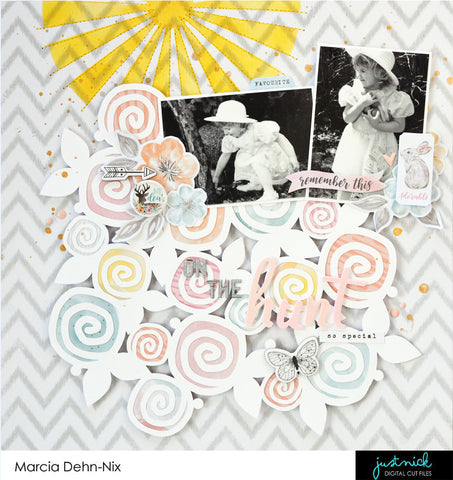
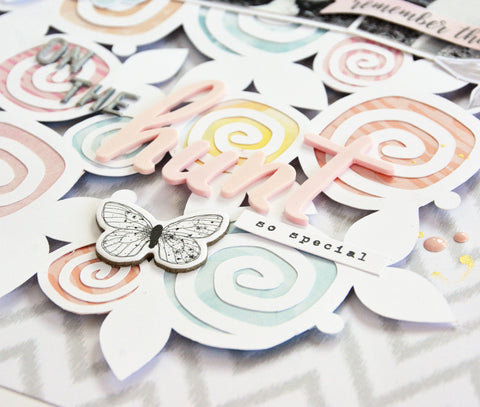
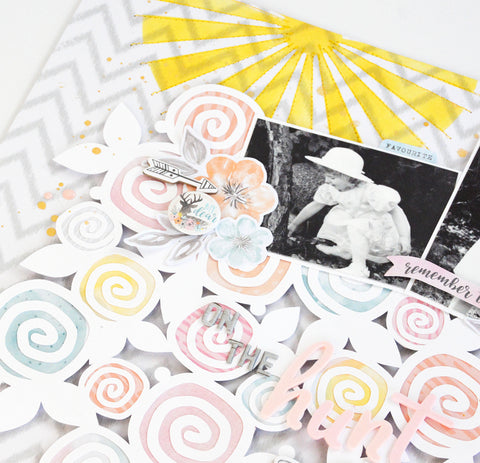
With Winter hanging on here in Minnesota and 2 feet of snow on the ground I was desperately needing some sunshine ... even if it was just on my layout. I decided to scrap some older photos of my daughter hunting for Easter eggs on a beautiful Easter morning. Spring = sunshine + flowers. I think I have everything covered on this layout I created for JustNick Studios. I am using the gorgeous Cocoa Vanilla Studios More Than Words collection.
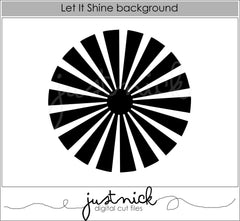
I love using a digital cut file as a stencil and decided to use the Let It Shine Background to create my sun. Some machine stitching added some texture and definition to the sun's rays.
I used some soft pastel pattern papers to back the Scribble Floral Background. What an abundance of beautiful Spring flowers!
I love these pics. My Naomi was so adorable in her Easter dress and bonnet.
Here are the digital cut files I used today ...
If you are interested in watching my YouTube Process video here it is...
Thanks so much for stopping by today. I sure do hope Spring arrives here soon. Have a great weekend!
Hello blogging friends! I think I must have Spring fever... I feel like it's been forever since I scrapped a really girly layout. Sometimes I just want to scrap pink flowers and yellow butterflies and imagine that Spring is just around the corner, especially when it's snowing outside (again!). I found the pretty JustNick StudioBoho Florals 3 and the Stems 5 digital cut files and created a gorgeous cluster to ground my photo. I was so happy to receive the new gorgeous Cocoa Vanilla Studios More Than Words collection just before the snowstorm. It's soft pastels were perfect for my Spring layout and this old black and white photo of my two girls. My Little Scrapbook store was awesome to let me preorder this Australian scrapbook manufacturer as it is difficult to find here in the States.
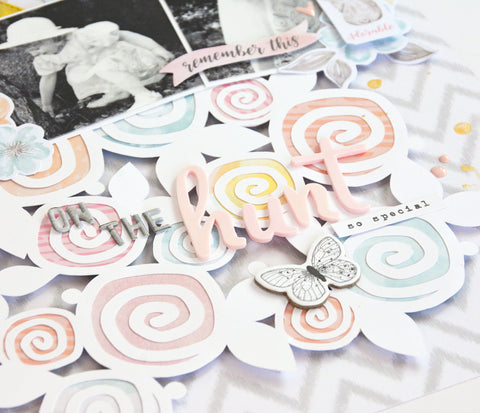
To add color behind my white cut files, I watered down some acrylic paint and painted a line of yellow, orange, and pink across my page and then tapped my paper to make the paint run. Then I added a few paint splatters and some stamped butterflies and I had a beautiful background! Here are some detailed shots ....
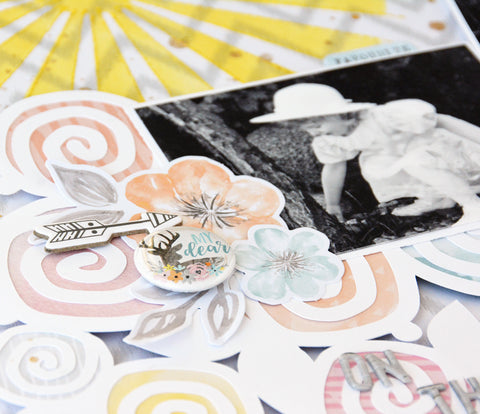
To make my flowers and stems more interesting I added sequins to the center of the pink flowers and drew some lines on the leaves with a marker.
The paint and the grey leaf stems help make the white floral cut file pop instead of blending into the background.
Here are the digital cut files I used today ...
Here is my process video if you are interested ...
I hope the rest of your week is fabulous! Take care,
~Marcia
I am so excited to be sharing my Top 10 scrapbook layouts with you again this year! If you are hopping along, you would have arrived from Suzanna Lee's blog. If not, no worries, you can start hopping at the end of this post. I have 2 Giveaways going on ... details are also at the end of this post.
1. Capturing Joy - The highlight of my year was being asked to design a cover for Scrapbook and Cards Today magazine Summer Issue! a COVER!!! They ask 3 designers to create a layout with their supplied photo, title, and journaling and choose one for the cover. Unfortunately, mine did not make the cover, but was still showcased inside! So 2017 was the year I was almost ... almost a cover girl. Here is my take. I used the Simple Stories Say Cheese III collection. It's totally cover worthy, right?
2. Winter Wonderland - I had a blast designing for JustNick Studios and Simple Stories! This layout I created with the Winter Wonderland collection and the Nordic Background 2 digital cut file.
3. Sweet, I Love Your Face - Here is another JustNick Studios and Simple Stories layout using the Love & Adore collection and the Ring Around My Heart digital cut file. What could be cuter than selfies with your dog, lol.
4. Mermaid Hair Don't Care - Mid Year I started designing for Paper Issues. This layout was created with the electrifying Pink Paislee Summer Lights collection and FREE cut files from Paper Issues.
5. Bring On Summer - Some fellow designers and I started doing a Stash Bash YouTube series a while back. Every month we pick an item in our stash and then create YouTube videos using that item from our stash. For July, it was washi tape. I love my washi tape! On this layout, I used loads of washi tape all down one side of a sheet of 8.5x11 cardstock. The only pattern paper used was the 12x12 background paper which was also Pink Paislee Summer Lights. The title and Sun were created using JustNick Studio digital cut files.
6. Love You - This is another layout I created for Paper Issues using the beautiful Crate Paper Carousel collection by Maggie Holmes. It was prefect for my Myrtle Beach ferris wheel pic. I love the soft colors combined with the pop of black and white stripes ... and those gold thickers are amazing.
7. Life Is Amazing - I could not wait to get my hands on the awesome PinkFresh Studio's Escape the Ordinary collecton. There are some layouts that just come together so easily. This was one of them. Clearly I was having a short love affair with triangles this year! How could you not with amazing pattern papers like this one. I love the photo cropped in a triangle. Machine stitching emphasizes all the triangles, then dimension was added with some Creative Embellishments triangle chipboard pieces that I found in my stash. Even more triangles were placed along the bottom using the Compressed Chevron digital cut file from JustNick Studios. The Life Is Amazing title is also from JustNick Studios.
8. Dream Big - This was another layout created for the Stash Bash YouTube series. In November, we challenged ourselves to use our spray mists. I used the plastic packaging smoosh technique to add splashes of color to my background after using a Silhouette sketch pen to draw this awesome dream catcher. It is a digital cut file in the JustNick Studios on-line store. I really wanted to do some hand stitching on the dream catcher ... ok a LOT of hand stitching! It took forever, but I love the end result. The feathers were also colored using the same ink as I used on my background. I embellished it with the Cocoa Vanilla Studios Bohemian Dream collection. This is another collection I could not wait to get my hands on! so GORGEOUS.
9. Poogan's Porch - I scrapped lots of photos from our vacation to South Carolina this year. Poogan's Porch was a favorite place we had lunch in Charleston. People, the food was AMAZING! I used the Pebbles Simple Life collection and a JustNick Studios digital cut file to create the background. I wanted to create the look of beautiful tin ceilings that you find in old houses.
10. So Very Blessed - My last layout is another using the Crate Paper Carousel collection by Maggie Holmes and even more JustNick Studios digital cut files. I love this photo I captured of my niece's family. I printed it in black and white so as not to detract from the colors in the Carousel collection. The fabric black and white striped bows are stunning. I used some flair from Pretty Little Studios to add some whimsy.
Thank you so much for stopping by!
My first GiveAway is a $20 gift card to the Paper Issues on-line store. You must enter this giveaway on my YouTube Channel. I would love to have you stop by and become a new subscriber. A winner will be selected on January 7th. You can get the details here...
My second GiveAway is also on my YouTube channel. If you are a cardmaker, you will want to check this one out. On this video, I am showcasing most of my Christmas cards I created this year. This GiveAway ends on Dec 31.
Here is the blog hop list ... So many of these awesome designers are also having giveaways! Be sure to check them out. Next up is Laura Cox .