Showing posts with label Family. Show all posts

Tuesday, January 21, 2025

January Layout Share - My Creative Scrapbook

Hey everyone. I am so excited to share my layouts created with the January Main kit from My Creative Scrapbook. This gorgeous kit features the Simple Stories Front Porch collection with a single Bo Bunny piece of pattern paper thrown in. Every month the kit also includes a sketch and digital cut files from the Cut Shoppe. Here's what I created this month ...

1. Blessed - I've wanted to scrap these photos of my mother-in-law for a while and the Front Porch collection was the perfect blend of papers of ephemera to do it. I tucked a Cheery Lynn doily behind my photos to give it a more vintage vibe.


2. My Story - I did lots of fussy cutting on this layout... all those lace strips that I arranged in rainbow order inside my heart. This is an older photo of my husband and kids lounging in a hammock on a lazy summer day. The ephemera and phrases could not have fit my photo better!


3. Home - A grid design works to create a makeshift house on my layout with a photo of my husband and I sitting on the front steps. I used an Echo Park cut file to create my windows.


4. Family - My niece welcomed a new baby boy into her family this past summer. The floral bits and Family ephemera were perfect for these outdoor photos. I used the Bo Bunny paper for my background. It meshed with the Front Porch collection beautifully.


My Creative Scrapbook puts together 4 kits every month. I used the Main kit for these layouts. Each kit is put together beautifully. There is really something for every kind of scrapbooker! Go check them all out.


Thanks so much for stopping by.
~Marcia


Saturday, November 14, 2020

Family Is Everything - My Creative Scrapbook

 Hello blogging friends!

I'm back today to share my second layout I created with the beautiful November Main kit from My Creative ScrapbookThis awesome kit features the Pebbles The Avenues collection as well as some Simple Stories Cozy Days, a stamp and stencil set from Hampton Art, and fabulous cut files from PearTree Cut Files. Starting to create this layout I knew I wanted to use the Family Is Everything cut file from PearTree Cut Files and I wanted to play with my Distress Oxide inks on a black background. Here is how it turned out ...

This pattern paper is from the Pebbles The Avenues collection. Is that mixed media background not AMAZING! Look at that color!!

I used lots of the die cut floral ephemera pieces sticking to the blues. There are even cat and dog ephemera pieces so of course I had to use them.


And look... a family photo! It's a miracle!!!! Or at least a rare event for my 911 dispatcher daughter, my emergency veterinarian daughter, and my bar manager son.

I LOVE these cut files from PearTree Cut Files. She is located in the UK, but the digital cut files are instant downloads and currency can be converted to dollars.

More die cut ephemera here and foam stickers from the Simple Stories Cozy Days.


Take a look at my trial and error approach to using the distress inks.


My Creative Scrapbook Kit Club ... http://mycreativescrapbook.com/mobile... PearTree Cut files ... https://www.peartreecutfiles.co.uk/ Below are affiliate links. I earn a commission on sales from these links and they do not add any cost to your purchase price. Pebbles The Avenues - http://shrsl.com/2lheq Simple Stories Cozy Days - http://shrsl.com/2lheu Fineline Glue Bottles - https://amzn.to/3cGaVbx Cutter bee Scissors - https://amzn.to/2YdgXei Prima Marketing Art Basics Black Gesso - https://amzn.to/3eyTqfN Hampton Art Stamp and Stencil Set, Mod Greetings - https://amzn.to/38az5fO Ranger Ink Blending Tool - https://amzn.to/36Op9rv Ranger Ink Blending Tool Replacement Foam Pads- https://amzn.to/2GHxxOT Distress Oxide Inks - http://shrsl.com/2lkbr   (I used Speckled Egg, Salty Ocean, Faded Jeans, and Blueprint Sketch) Nuvo Crystal Drops - http://shrsl.com/2lkca (Morning Dew) Tim Holtz Glass Media Mat ,Black - https://amzn.to/2BamtXJ Silhouette Cameo 4 - https://amzn.to/3ddGqeU

Thanks so much for stopping by. Have a great weekend!
~Marcia

Monday, April 6, 2020

Let's Stay Home - My Creative Scrapbook

Hello blogging friends,

How are you all holding up? In Minnesota the governor has ordered us to stay at home. I have been working remotely for 3 weeks now. I am lucky that my daughter is doing all my grocery shopping for me now. My son also ran some errands for me before the lockdown started to make sure I had enough cat and dog food and then some to last a couple months. I worry about my elderly parents and aunts and uncles though.

It helps to pass the time inside playing with pretty papers like the My Creative Scrapbook April kit. It is gorgeous!! Check out my kit unboxing here...


Paige Evans shared a FREE Let's Stay Home cut file on her Facebook Happy Scrappy Page and I could not resist using it for my first layout with the kit.


 Here is a closer look at the cut file...


The April kit include 11 amazing cut files as well. I used a few of the flower cluster cut files to tuck under my title. I added some fussy cut flowers, chipboard pieces and die cut ephemera.


Lindy's Gang Magicals were used to create my watercolor background. I like how they add some color underneath those cut files.


Here is my sweet guy whom I get to be isolated with. Love him!


Please check out my process video ...


Thanks so much for stopping by. Stay home please and stay safe!
~Marcia

Monday, March 2, 2020

Family Is For Keeps - My Creative Scrapbook

Hello blogging friends!

I have one more layout to share with you that I created with the beautiful February Main kit from My Creative Scrapbook. This kit featured the Simple Stories So Happy Together collection along with some pattern papers from PhotoPlay Paper's We Are Family collection and the Pebbles This Is Family collection. This was the 4th layout I created, and I can't believe how much of the kit I still have! I wanted to scrap a family photo for this one and focus on the houses.


I used an exclusive cut file from My Creative Scrapbook and backed the negative space with some of the pattern papers from the kit.


I used chipboard and sticker embellishments from the So Happy Together collection, concentrating on those items found in your home, like this chair and lamp.


One of the chipboard houses was just what I needed to add some dimension to this 4x6 journal card cut from a sheet of 12x12 pattern paper.


If you are interested in watching my process video, here it is....


Thanks so much for stopping by. The March kit from My Creative Scrapbook is even more AMAZING if you can believe that! I'll be posting a kit unboxing and layouts that I created with it in a few days. Stay tuned!

~Marcia


Wednesday, February 12, 2020

Our Family - My Creative Scrapbook

Hello blogging friends!

I've been having so much fun with the My Creative Scrapbook February Main kit. It's such an awesome kit full of the Simple Stories So Happy Together collection along with some PhotoPlay Paper We Are Family collection and a little Pebbles This Is Family collection. This 3rd layout I created uses the awesome sketch for their monthly sketch challenge.


Here is the sketch...


 As you can see, I took a few liberties. I used only 2 photos and flipped the sketch horozontally so my vertical photo is on the right. Feel free to flip the sketch anyway you want to suit your photos.

Take a look at these embellishment clusters...


Those Simple Stories So Happy Together embellishments were divine! Of course I added a few of my precious digital cut files too; doilies from the Silhouette Inc store and stems from JustNick Studios.


Want to see how this all came together? Watch the YouTube Video here...


Take a peek at the other layouts I've created so far too ... One more coming Friday so be sure to stop back. Have a great week!

~Marcia


Saturday, February 23, 2019

Winter Wonderland | JustNick Studios

Hello from snowy Minnesota today!

We are still digging out from our latest snowstorm...  and getting ready for another 4"-8" over the weekend. How fitting that my JustNick Studio layout today is a winter one. I really wanted to get this family photo scrapped before spring settled in and we were all sick of winter. (Ok... some of us are already sick of winter!) Check out my layout anyway. I used the Echo Park Celebrate Winter collection...


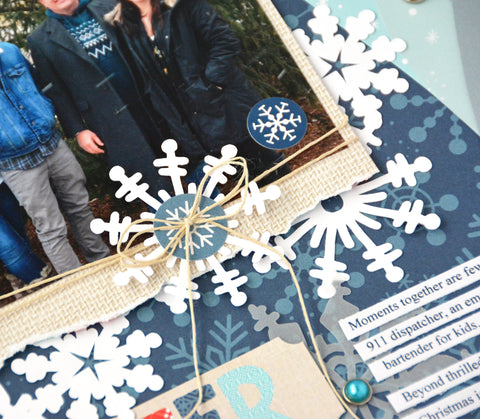
I used the Snowflake Cluster cut file to ground my photo. The white snowflakes make quite an impact against the dark background.


I wanted to scatter a few more snowflakes onto my page and discovered the Snowflakes 2 cut file has some of the same snowflakes! I cut them out twice, once with white cardstock, then again with vellum. The vellum snowflakes soften my page a bit and I could add a layer of snowflakes over my photo as well.


Along the right side of my layout I arranged a variety of papers and vellum with lots of curvy edges. I wanted you to think blowing snow when you saw it. Here I layered some of the white and vellum snowflakes to create this beauty!


I love how this turned out ... maybe more so because my favorite people are in this photo.


Here are the cut files I used today ...


Thanks so much for stopping by today. If it's snowing where you live, get outside and snap a few photos! There are plenty of winter cut files in the store that are perfect for documenting them.

Friday, October 5, 2018

Home Sweet Home - JustNick Studios

Hello blogging friends!

Before the first frost here in Minnesota, I wanted to get a photo of my hubby and I on our front step. I like to fill my front step with pots of flowers and ferns. It makes me happy to see the plants when I come home. I decided to scrap that photo using the JustNick Studio Home Sweet Home digital cut file.


Home Sweet Home made for the perfect title. I layered some gold over the top to create some added interest.


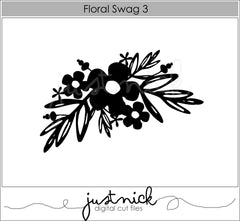
I knew I wanted to include some florals behind my photo and decided on Floral Swag 3. I filled the flowers with a variety of pink pattern papers.


Here are the digital cut files I used today ...


Thanks so much for stopping by today!

Monday, May 21, 2018

Squat Your Dog - Jillibean Soup

Hello blogging friends!

I so enjoy when I can spend any time with my kids. My daughter was out with her Great Pyrenees the other day and was complaining about how sore her legs were from doing squats at the gym. The next think I know my son and daughter are doing squats with the dog and video taping it. Evidently squatting your dog is a new craze and tons of people are posting videos doing it. lol. I managed to extract these still photos from the video. I used the 2 Cool For School collection from Jillibean Soup.


I created a circle in Silhouette Studio and dissected it with lines to create a pie chart. Then I cut each section of the pie chart from a different pattern paper. This way I could use several patterns to frame my photo.


I used another cut file to create the Squat for my title, added some stickers and the large letter die cuts for the Dog portion of my title.


I couldn't resist adding the 2 corgi dog die cuts to set off my title. They were the perfect touch.


Here is a link to my process video. I would love to have you stop by and take a look.


Thanks so much for stopping by. Have a great week!


Friday, March 30, 2018

He Grew - JustNick Studios

Hello blogging friends!

This week on the JustNick Studio blog the focus has been on flowers, perfect for Spring. In Minnesota, I am still waiting for those flowers as there is still snow on the ground. It cheers me up though to be able to create with some beautiful flowers. Spring is also a time when the children in my church make their first communion. So I thought combining flowers on this layout of my Dad on the day of his first communion would work. My Dad grew up on a dairy farm, the youngest of 11 children. My grandparents are posed with him in this photo. It brings a smile to my face as I see my Grandpa dressed up ... he is wearing a tie with his bib overalls, lol.


I used the Floral Swag 3 and Blossom Blooms digital cut files and arranged them in a circle to frame my photo. Since I had greenery from the Floral Swag 3 cut flowers, I used my eraser in Silhouette Studio to erase the leaves from the Blossom Blooms cut file so I was left with just the flower. I did the same for the Floral Swag cut file so I could cut the flowers out of different pattern papers.


To add some dimension to my layout, I placed buttons in the center of my flowers and added even more flowers with some painted wood veneer pieces.


Here are the digital cut files I used today ...


If you are interested in watching my YouTube process video here it is ...


I hope I've inspired you to add some flowers to your Spring layouts too. Thanks so much for stopping by today. Have a delightful Easter weekend.